
The site log
A permanent timeline of everything that happens on each site: who did it, when, and what changed.
Updated Oct 11, 2026
Every site has a Log: one timeline of everything WP Foreman did on it and everything that changed. It’s kept for as long as the site is in your account, and it’s what client reports and the “while you were away” summary are built from.
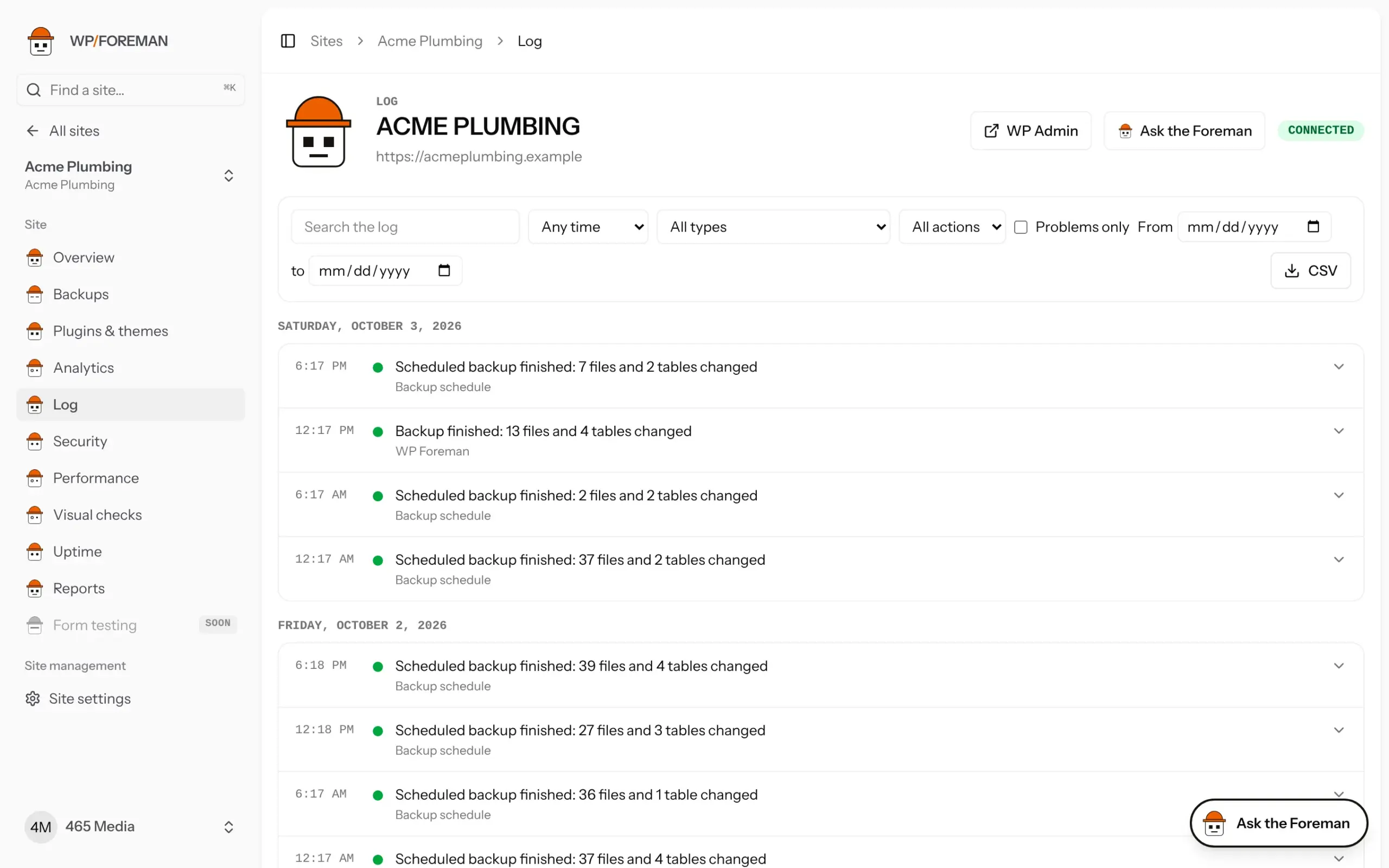
Where to find it
- One site: open the site and choose Log in the left menu.
- All sites: Activity log in the main menu. Pick a site from the list to narrow it down.
What gets logged
| Category | Entries |
|---|---|
| Backups | Every backup that finished or failed (scheduled, manual, before an update, before a restore) with what changed and how much storage it added. Changes to backup settings. Old backups removed by the keep rules. |
| Restores & clones | Every restore (whole site, files, database or single items) and every copy to or from another site, with the backup it came from. |
| Plugins, themes & WordPress | Installs, updates (with old and new versions), activations, deactivations and deletes made through WP Foreman, including partial failures. |
| Changes made on the site | Plugins or themes installed, removed, updated or switched on or off in wp-admin, by WordPress auto-updates or by your host. With plugin 0.7.0 these arrive within seconds with the WordPress user’s name (see Know when someone changes a site); otherwise WP Foreman spots them at its next check, about every 30 minutes. |
| Connection | The site connecting or disconnecting, being removed or brought back, and WP Foreman plugin updates. |
| Rules | Every time a rule ran on the site, skipped it (and why), or paused itself. |
| Sign-ins | Each time someone used the WP Admin button (including WP Foreman support, when you allowed it), administrators signing in to wp-admin directly, and new administrator accounts (plugin 0.7.0). |
| Users | WordPress users added, edited, given a new role, sent a password reset or deleted from the site’s Users page. |
| Uptime | The site going down and coming back, checks being blocked by a firewall, and SSL certificates or domains about to expire. |
| Performance | Speed score drops of 10 points or more. |
| Reports | Client reports emailed. |
| Security | Known vulnerabilities found, and gone once fixed. |
| Visual checks | Each visual check, and whether pages looked the same or different. |
Who did it
Under each entry is who or what made it happen:
- A person’s name: someone clicked it in WP Foreman.
- The Foreman, approved by …: the Foreman proposed it and that person approved it.
- API (token name): an app or script using one of your API tokens, for example Zapier.
- Backup schedule or Rule: it ran on its own.
- A WordPress user (name, email, role, IP): someone changed it in wp-admin, through WP-CLI or the REST API.
- WordPress auto-update: WordPress updated it on its own.
- Made on the site, outside WP Foreman: a change WP Foreman found but WordPress couldn’t name, for example files changed over FTP.
- WP Foreman support: our team, signed in with your permission on a support request.
- WP Foreman: an automatic step, such as the backup taken before an update.
Colors
Green: finished fine. Grey: for your information. Orange: partly worked or worth a look. Red: failed.
Find what you need
- Search for a plugin, theme or site name.
- Pick a type (a category such as Backups), then an action inside it (such as Backup failed or Plugin installed) to narrow it down further.
- Tick Problems only to see just warnings and failures.
- Pick a date preset: Today, Last 7 days, Last 30 days, This month or Last month (handy for client reports), or set your own From / to range. Dates follow your timezone.
- Click an entry with an arrow to see the details: each plugin and its versions, files and tables changed, errors.
Export
Click CSV to download what you’re looking at (with your filters) as a spreadsheet: date and time, site, category, what happened, result and who.
Ask the Foreman: “What changed on Acme Plumbing last week?” or “Did anything fail overnight?” It reads the same log.
The log started on September 13, 2026. Backups, restores and plugin changes from before then were added to it automatically. Changes made outside WP Foreman and sign-ins are logged from that date on.
Thanks. If something was missing, tell us what.