
Known vulnerabilities (Security)
The Sweeper checks every site's plugins, themes and WordPress version against a list of known vulnerabilities every night, and tells you what to update.
Updated Oct 11, 2026
The Sweeper checks every site’s plugins, themes and WordPress version against the publicly known WordPress vulnerabilities: every night against Wordfence Intelligence, and every hour against new CVE records from the other WordPress security teams, like Patchstack and WPScan (see where the data comes from). Sites are also re-checked whenever their plugins or themes change. Open a site and choose Security.
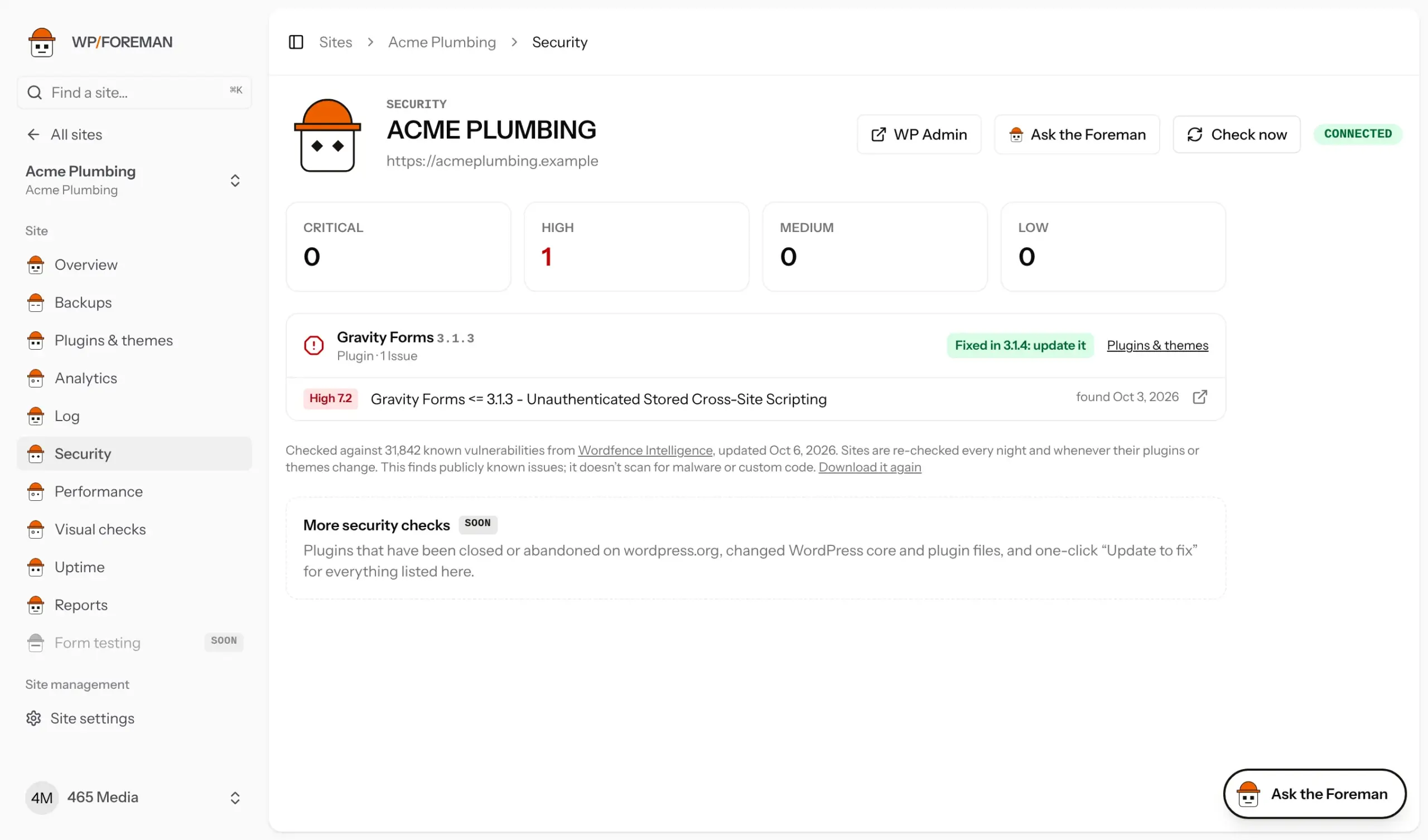
What you’ll see
- No known security issues when nothing on the site is on the list.
- Otherwise, counts by severity (Critical, High, Medium, Low, from each issue’s CVSS score), then each affected plugin, theme or WordPress with its installed version and its issues.
- Fixed in x.y: update it when a newer version fixes every issue listed. Update it from Plugins & themes or the Updates page.
- No fix yet when the author hasn’t released one. Consider deactivating, removing or replacing it, especially for Critical and High issues.
- The link next to each issue opens its full write-up (and CVE, when it has one).
- Fixed in the last 90 days: issues that went away because you updated or removed the software.
Where else it shows up
- A Security tile on the site’s Overview, and a badge next to the update count on the Sites list.
- Your morning report lists sites with open issues under Needs you, and the Sweeper reports what it found and cleared.
- The site’s Log records when issues are found and when they’re gone.
- Client reports mention open issues under Needs attention.
- Rules can react: trigger A known security issue is found on a site, for example to update that plugin right away. See Rules reference.
- Webhook
security.foundand APIGET /sites/{id}/security.
Where the data comes from
Several security teams find and publish WordPress vulnerabilities, and each publishes its own finds first. WP Foreman combines them so a new issue shows up the day it’s published, whoever found it:
- Wordfence Intelligence: the full database, downloaded every night.
- CVE records from the official CVE list, checked every hour. Patchstack and WPScan publish their finds there as CVEs, with the affected versions and the fix. That covers plugins and themes on wordpress.org and the premium ones they name (ThemeForest, CodeCanyon and the like).
When the same issue is in both, it shows once, with Wordfence’s write-up. A few issues never get a CVE (mostly in premium plugins), so no single list catches everything.
Scanning, not patching
Security is a scanner. It tells you which websites have a known vulnerability, how serious it is and which update fixes it. It doesn’t change anything on the website or block attacks: the fix is the update, which you apply from WP Foreman (or let a rule apply).
- It finds publicly known issues in plugins, themes and WordPress itself.
- It doesn’t scan files for malware, run a firewall or review custom code you’ve written.
- When there’s no fix yet, nothing protects the website until the author releases one, so deactivate or replace the plugin if the issue is serious.
Virtual patching, which blocks attacks on a known vulnerability before you’ve updated (or before a fix exists), is on our roadmap as an optional paid add-on. Scanning and alerts stay included in every plan.
Ask the Foreman: “Which of my sites have critical security issues, and what do I update?”
Thanks. If something was missing, tell us what.