
While you were away
The crew's report: what got done, what needs you, and what's waiting for your OK, on your dashboard and by email.
Updated Oct 11, 2026
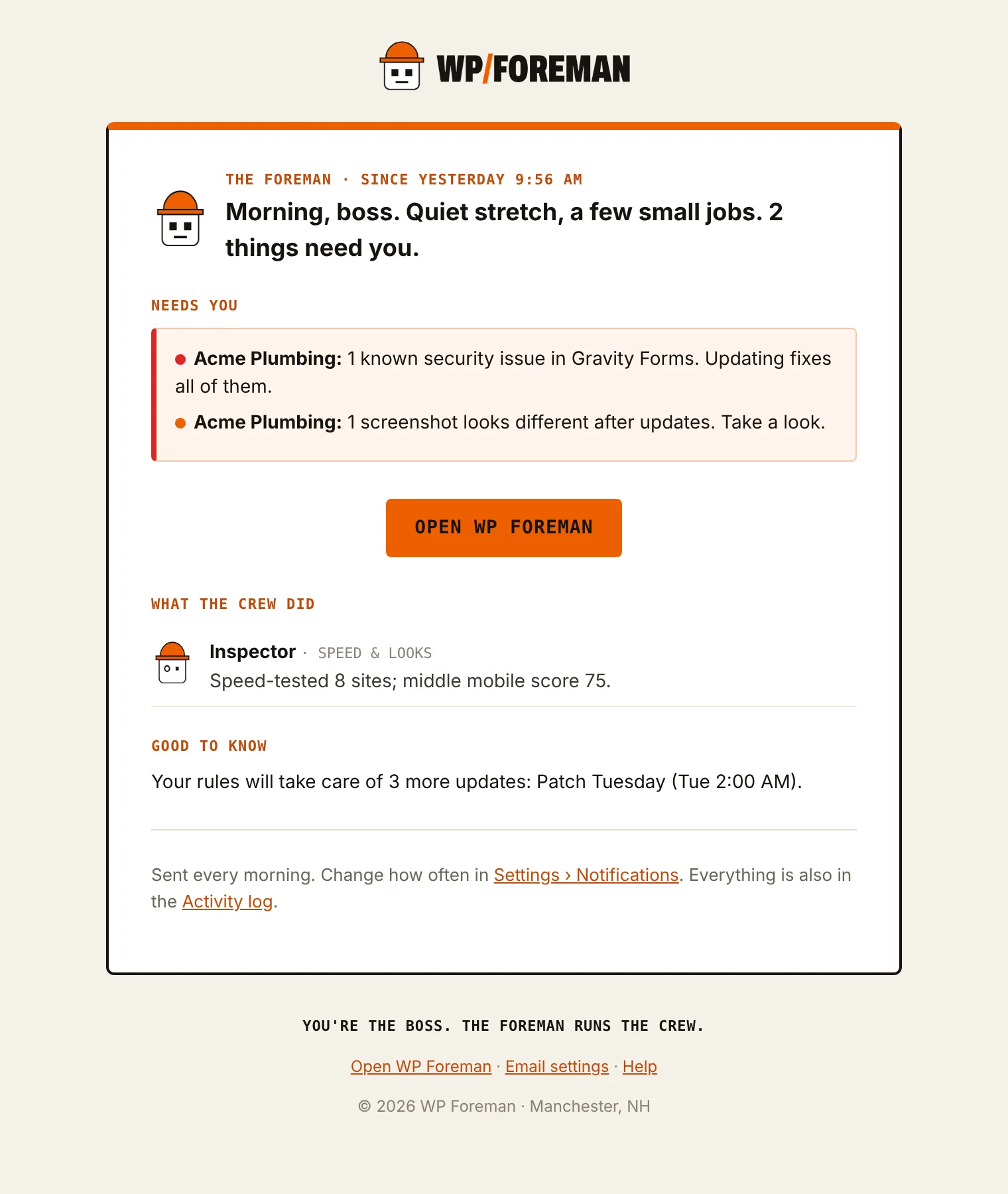
Every time you open WP Foreman, the crew tells you what happened since you last looked, and what they need from you. The same report can land in your inbox every morning or every Monday.
What’s in it
| Section | What you’ll see |
|---|---|
| Headline | One line from the Foreman: “The crew backed up 14 sites and applied 9 updates. 1 thing needs you. 2 things are ready for your OK.” |
| Needs you | Things that are broken or stopped right now: a site whose last backup failed, a site that’s down, disconnected or can’t be reached, an SSL certificate or domain expiring within 14 days, known security issues, pages that look different in a visual check, a rule that paused itself, an update or restore that failed, a plugin that wordpress.org pulled (closed), often for a security problem, or a renewal coming up. |
| Ready for your OK | Work the crew can do the moment you say so, that none of your rules will do on their own: WordPress core updates, plugin and theme updates, and WP Foreman plugin updates. Each has an Approve button. |
| The crew | What each crew member did. Lockup: backups, copies to your storage, restores. Rivet: updates and plugin work. Watchman: outages, changes made outside WP Foreman, WordPress auto-updates, new admins, sign-ins, disconnects. Inspector: speed tests, score drops and visual checks. Sweeper: security issues found or cleared. Rules: what your rules did. On the dashboard these are under Handled. |
| Good to know | Things you can’t fix with a button: premium updates that can’t download because the license isn’t active, plugins or themes that haven’t been updated on wordpress.org in two years or more (possibly abandoned), sites that haven’t checked in for two days, and updates your rules will handle at their next run. |
| Changed outside WP Foreman | The plugins, themes, WordPress updates and admins someone changed in wp-admin, over FTP or through the host, with who did it when WordPress knows (plugin 0.7.0+), marked “(changed outside WP Foreman)”. On the dashboard they’re under Needs you; in the email, under Good to know. WordPress’s own auto-updates aren’t listed here. |
Approving updates
- Under Ready for your OK, read the line: the site, what will change and the versions. Major updates are marked (major); WordPress feature releases say (feature release).
- Click Approve on one line, or Approve all. Majors ask you to confirm first.
- The crew backs up each site, then updates. The line is stamped OK’d, and the result shows in the site’s log a few minutes later.
Approving is exactly the same as updating from the Updates page: backup first, and if that backup fails nothing on the site is changed.
If you approve the same kind of update every week, make it a rule. Patch Tuesday or Daily security patches will do it for you, and those updates move from Ready for your OK to Good to know (“Your rules will take care of …”).
On your dashboard
The report is your dashboard’s Job board, with three columns: Needs you, Ready for your OK and Handled. The headline sits at the top of the page. It covers everything since you last clicked Mark all as read (at least the last day, at most the last week). Click Mark all as read when you’ve read it; next time it starts from there. Items under Needs you and Ready for your OK stay until they’re fixed or done, whatever the date.
By email
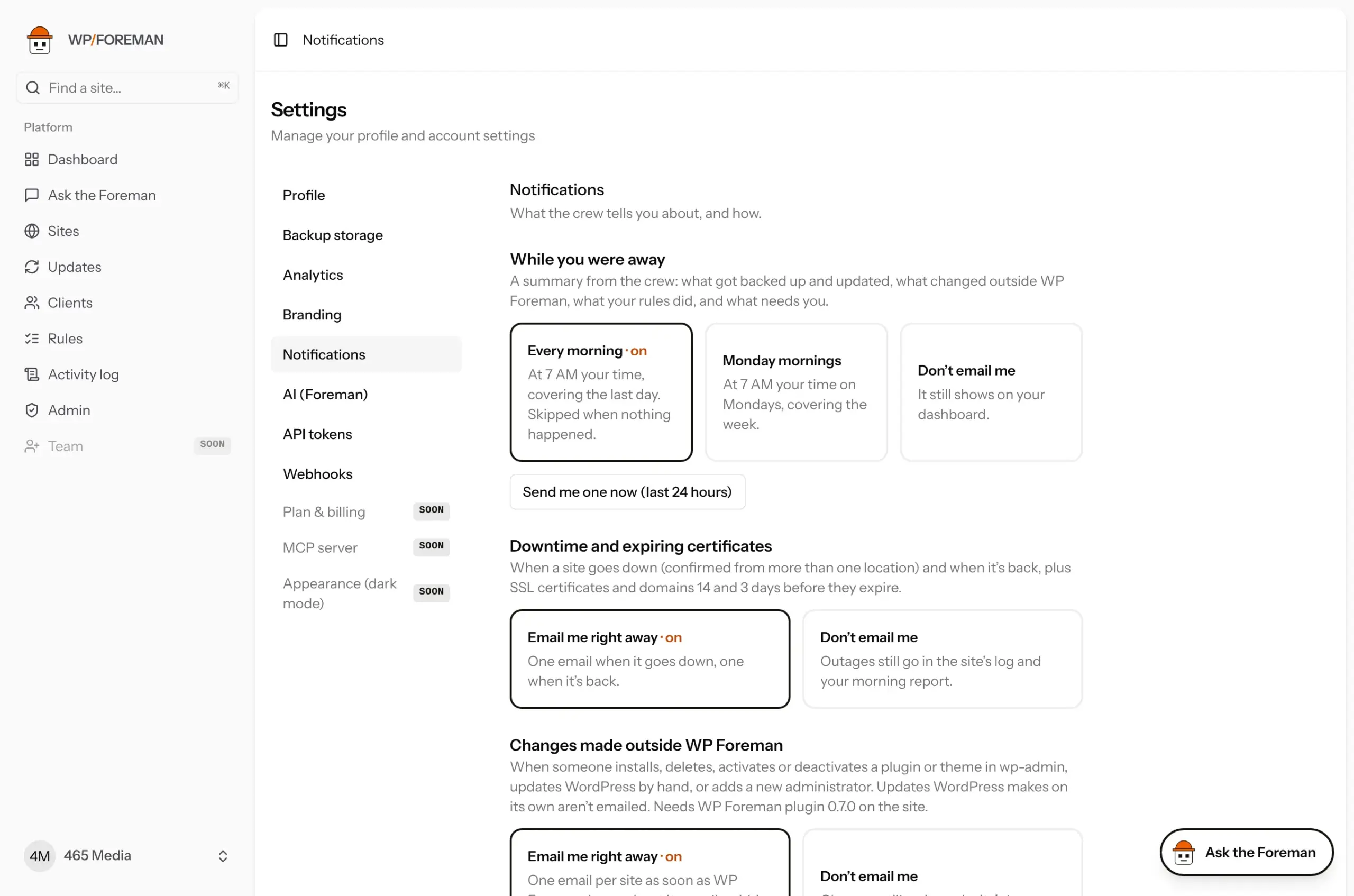
Choose in Settings › Notifications › While you were away:
| Option | When |
|---|---|
| Every morning (default) | 7 AM your time, covering the last day. Not sent when nothing happened and nothing needs you. |
| Monday mornings | 7 AM your time on Mondays, covering the week. |
| Don’t email me | Never. The dashboard still shows it. |
The subject starts with Needs you when something is broken. The email lists what’s ready for your OK, but you approve it in the app (Review and approve). There are no approve links in the email, so a forwarded or scanned email can never change a site.
This report is separate from the instant “Heads up” emails about changes made outside WP Foreman and from the emails each rule sends. Set those in Settings › Notifications and on each rule.
Ask the Foreman: “What happened while I was away?” or “What’s waiting for my OK?”
Thanks. If something was missing, tell us what.