
Clone or migrate a site
Copy any backup onto another connected site to make a staging copy or move hosts. URLs and table prefixes are fixed for you.
Updated Oct 11, 2026
Cloning copies a backup of one site onto another site you’ve connected to WP Foreman. Use it to make a staging copy, to refresh staging from live, or to move a site to a new host or domain.
Move a site to a new host or domain
- On the new host, install a fresh, empty WordPress at the new address.
- In WP Foreman, add it under Sites and connect it with the WP Foreman plugin (see Add and connect a site).
- On the old site’s Backups page, pick the backup to copy (usually run Back up now first for the latest).
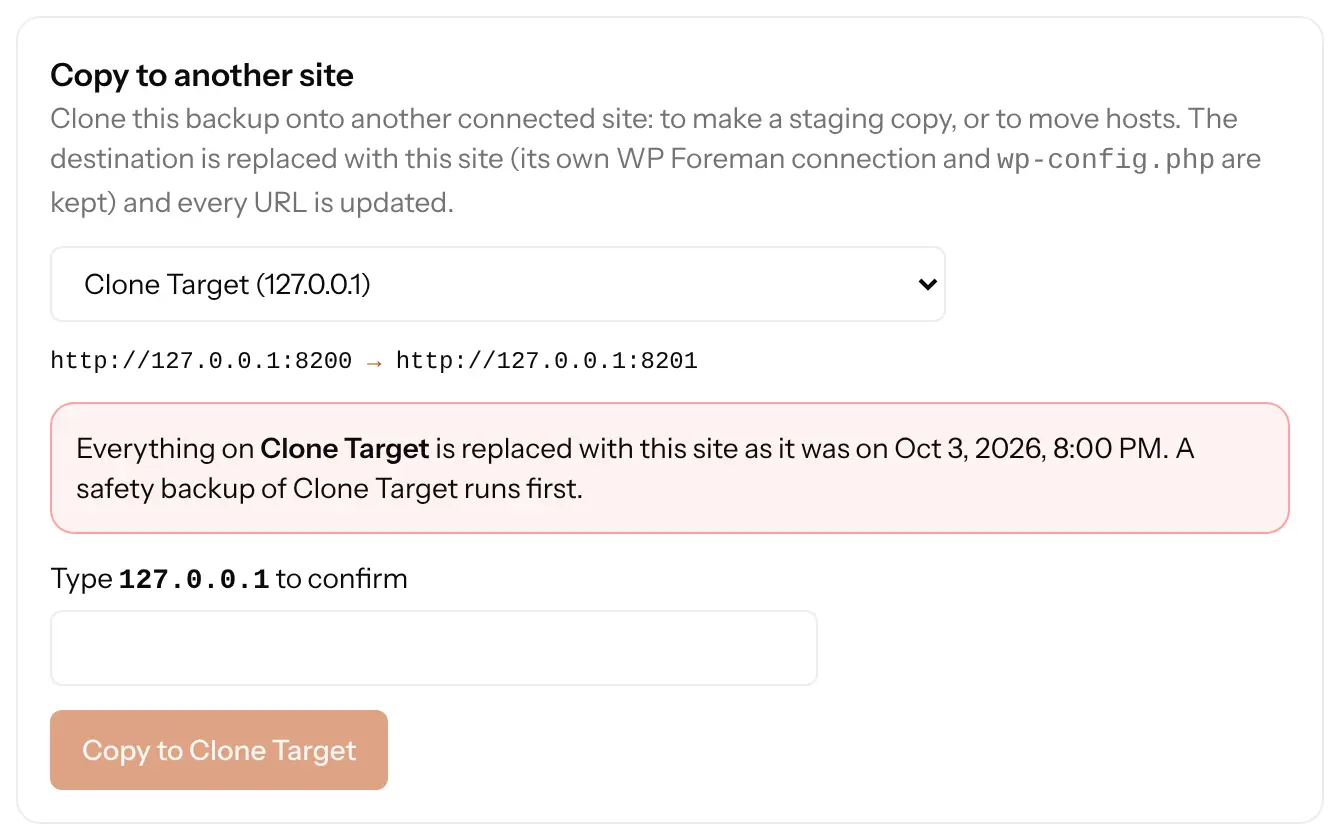
- Open the Restore tab and, under Copy to another site, choose the new site. Check the URL change shown, e.g.
https://old.com → https://new.com. - Type the new site’s domain to confirm and click Copy to … (the new site’s name).
When it finishes, the new site is an exact copy of the old one at its new address. Then point the domain’s DNS at the new host if it’s moving.
What WP Foreman takes care of
- Every URL: the old address is replaced with the new one everywhere in the database, including inside serialized plugin settings, page builder data and block JSON, without breaking them.
- Different table prefixes: if the old site uses
wp_and the new oneabc_, tables, user roles and user capabilities are renamed so everyone can still log in. - The destination’s own connection and
wp-config.php(database details) are kept, so it stays connected and working. - A safety backup of the destination runs first, in case you picked the wrong site.
Things to know
- Everything on the destination is replaced: its posts, users and files become the old site’s. Log in with the old site’s usernames and passwords afterwards.
- The destination needs WP Foreman plugin 0.5.0 or newer.
- Email addresses that contain the old domain (like
[email protected]) are not changed; only web addresses are. - Restoring from a .zip made by another backup tool, and creating a new admin user on the copy, are coming later.
Making a staging copy? Copy live onto staging any time to refresh it. The staging site keeps its own address.
Was this helpful?
Thanks. If something was missing, tell us what.